Invalidating consent before a given date
Ask for consent again if it was given before a certain date
Last updated About 1 month ago
How to invalidate consent before a given date with Consent Studio CMP
There are scenarios in which you would like consent states that are stored in users’ web browsers before a given date in time. The most prominent one is when a significant change was made to your tracking set-up and old consent for the categories Analytics and/or Marketing are no longer sufficient to carry forward.
With Consent Studio CMP, you can configure a date in time that will cause users that re-visit your website with a legacy Consent State and Consent ID in their browser storage to see the consent banner anew.
How To
Open the Consent Studio dashboard, scoped to the domain you would like to modify. You can learn how to switch between registered domains here.
Navigate to Domain Settings, which can be found in the navigation bar under the gear icon.
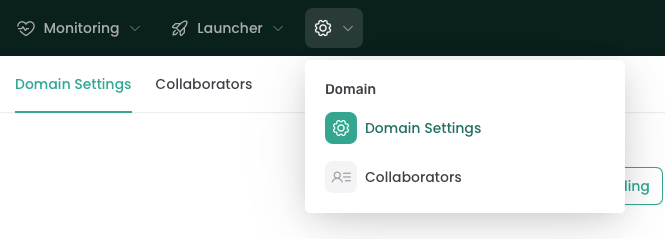
Open the Danger Zone tab.
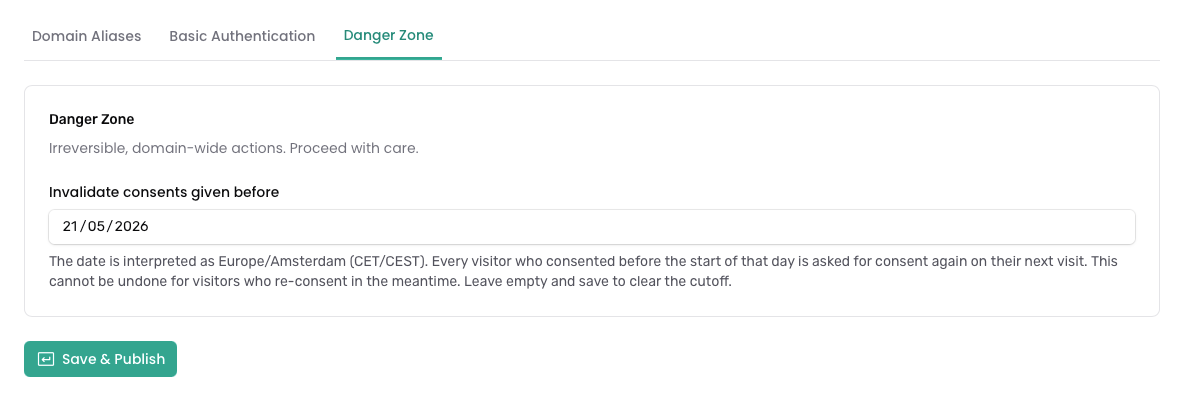
Select or type in a date in a valid date format.
The date must be in the future.
The date is handled in timezone
Europe/Amsterdam.To disable the cutoff, clear the value of this field.
Click Save & Publish for the changes to go into effect immediately.
This change can be undone, but new consent given by users will replace their previous consent state in their browser storage. Leave empty and save to clear the cutoff.
There is almost always a delay before your changes go into effect, since it may take a few minutes to update our CDN.
Still need help? Ask the team