Global Privacy Control
Last updated 25 days ago
How Consent Studio handles the Global Privacy Control (GPC) signal
Global Privacy Control (GPC) is a browser-level privacy signal. When a visitor enables it (in browsers like Brave or Firefox, or via privacy extensions), their browser advertises that they do not want their data sold or shared with third parties. Consent Studio can detect this signal and respond automatically, without your visitor having to interact with the consent banner.
Where to configure GPC in Consent Studio Web CMP
Being logged in to the Dashboard, open the Web CMP dropdown in the top navigation bar and head over to the Behaviour settings panel.
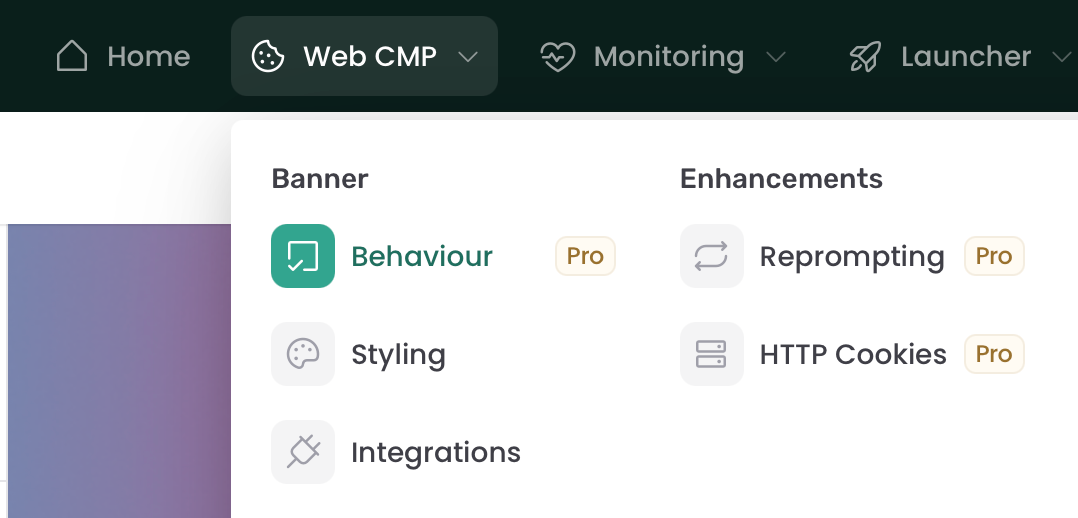
There, you can find the GPC Behaviour setting in the Advanced section.
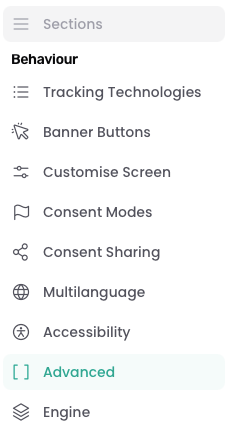
Here, you will find the GPC Behaviour dropdown. The options are explained further down this article.
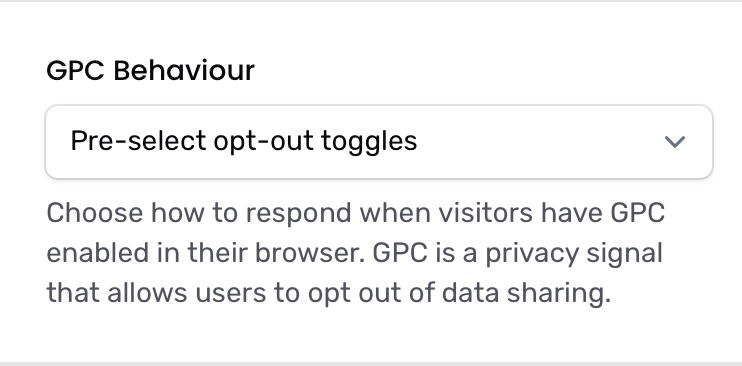
How we detect the GPC signal
Consent Studio reads the GPC signal directly from the visitor's browser using the standardised navigator.globalPrivacyControl property. We do not rely on the Sec-GPC HTTP header — detection happens client-side, the moment the consent banner script loads.
GPC only takes effect on a visitor's first visit. If they have already made a consent choice on your site, that explicit choice is always respected and GPC does not override it.
The three behaviors
Ignore GPC signal (default)
The consent banner ignores the GPC signal entirely and is shown as normal. Pick this if you want every visitor to make an explicit choice regardless of their browser settings.
Pre-select opt-out toggles
The consent banner is still shown, but the optional categories (such as analytics and marketing) are pre-unchecked. The visitor can still toggle them on and submit consent themselves. Use this when you want to nudge visitors with GPC enabled toward a more private default while still giving them the final say.
Auto-reject and hide banner
The consent banner is not shown at all. Consent Studio automatically records a "functional only" decision on the visitor's behalf and proceeds with the page. This is the strictest setting and the one to choose if you want to fully honour the GPC signal as an opt-out request.
When this happens, the consent submission is recorded with a GPC marker, so you can filter and review GPC-triggered decisions in your consent logs.
Overriding GPC behavior per region
If you use Geotargeting rules, each rule can override the site-wide GPC behavior for visitors in that region. Leave the field empty on a rule to use the site default.
You can find this on each rule under Banner → Geotargeting when you edit or create a rule.
Frequently asked questions
Does GPC override an explicit consent choice?
No. If a visitor has already accepted or rejected categories on your site, that choice is kept. GPC only acts on the very first visit before any consent has been recorded.
Which browsers send the GPC signal?
Any browser or extension that exposes navigator.globalPrivacyControl = true. This includes Brave by default and Firefox when "Tell websites not to sell or share my data" is enabled, among others.
Is GPC the same as the "Do Not Track" header?
No. Do Not Track (DNT) was a separate, older signal that most browsers and websites have since dropped. GPC is the modern successor and is recognised under several US state privacy laws as a valid opt-out signal.