Accessibility: screen reader announcements
How we announce banner changes to screen readers
Last updated About 1 month ago
Announcing (cookie) consent banner changes in screen readers with Consent Studio CMP
Screen readers are assistive tools that read out the contents of a screen to visually impaired users. Because the consent banner appears as an overlay on your page, screen reader users may not immediately know it's there or what happens when they interact with it.
To solve this, the consent banner uses an ARIA live region. This is a standard web technique that tells screen readers to announce changes out loud, without the user having to navigate to them. It works across all major screen readers including NVDA, JAWS, VoiceOver, and TalkBack.
The banner announces changes at three key moments:
When the banner opens: the user hears that a consent dialog has appeared, so they know something requires their attention.
When a cookie category is toggled: the user hears a confirmation of their action. For example, "Analytics enabled" or "Marketing disabled". This is especially important because toggles can be difficult to interpret with a screen reader — the announcement removes any ambiguity about the current state.
When preferences are saved: the user hears that their choices have been stored. Without this, there would be no clear feedback that the banner has closed and their consent was recorded.
Customising the texts
You can edit the wording of each announcement under Web CMP → Translations → Screen Reader Announcements.
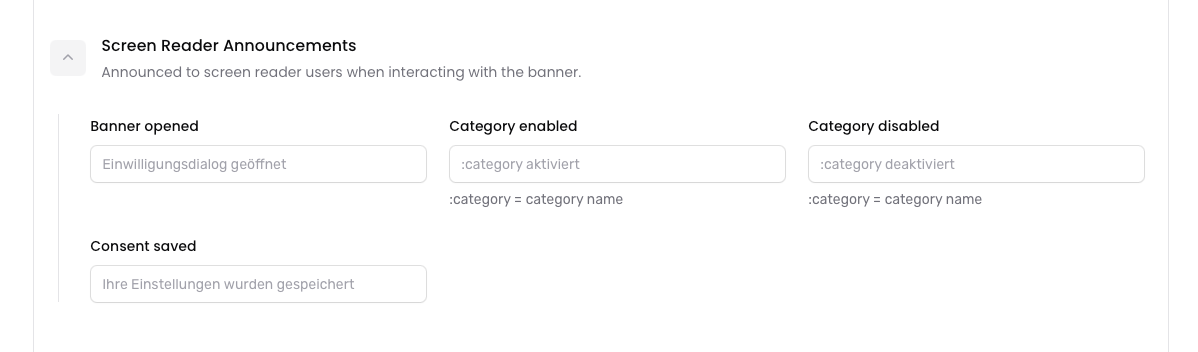
All texts support translations, so you can provide announcements in every language your banner supports. If you leave a text empty, a sensible default is used.
The category announcements support a :category placeholder, which is automatically replaced with the name of the toggled category (e.g. "Analytics" or "Marketing").
Announcement mode

Under Web CMP → Behaviour → Accessibility, you can choose how the announcements are delivered:
Polite (default) — The screen reader waits until it finishes its current output before reading the announcement. This feels natural and non-intrusive, and is the right choice for most situations.
Assertive — The screen reader interrupts whatever it is currently reading to deliver the announcement immediately. This ensures announcements are never missed, but can feel disruptive if the user is in the middle of something.
Customising the announcement texts is free on all plans. Changing the announcement mode requires a Professional plan.
Still need help? Ask the team