Changelog

Follow new updates and improvements to Consent Studio.

Consent Studio MCP: manage Consent Studio from your AI assistant
Hi there,

You can now connect an AI assistant like Claude or ChatGPT to your account with the Consent Studio MCP. Ask it about your domains in plain language and let it make changes for you, after your OK.

What it can do

  • Tracking technologies: review what Monitoring found, and add, change or remove tracking technologies on your list, including their category and description in each language.

  • Web CMP: your banner's texts, styling (every colour, in light and dark mode), behaviour, languages, geotargeting rules, integrations and Consent Sharing.

  • Monitoring: scan results and recommendations, the pages to scan, and requesting a new scan.

  • Launcher: tags made from a template and your variables, and publishing once you confirm.

  • Your account: adding a domain, inviting collaborators, starting a consent log export and your invoice details.

Two guided flows help you start: Set up a new domain and Install Consent Studio. Pick one in your AI app and the assistant asks one question at a time.

You stay in control

  • It works under your own permissions and your plan.

  • It can show what a change would do first, and it asks you before removing anything or adding something that costs extra.

  • Every change it makes is recorded with the name of the AI app.

Connect in three steps

  1. Go to Account > AI Connections and click Connect an AI app.

  2. Copy the MCP URL and add it as a connector in your AI app.

  3. Your AI app sends you back to Consent Studio. Log in and click Approve.

It works with Claude, ChatGPT and local clients such as Claude Code. Once connected, it covers every domain in your account. A connection lasts up to 90 days, ends after 30 days without use or when you change your password or email address, and you can revoke it at any time under AI Connections.

The Consent Studio MCP is available on all plans as soon as one of your domains has a subscription. You do not have to wait for your first payment: entering your payment details is enough, even while your remaining trial days run.


We thank you for your feedback and your trust in The Full Consent Stack.

On behalf of the team,

Thierry Maasdam
Head of Product
New

Web Bot Auth for Consent Studio Monitoring

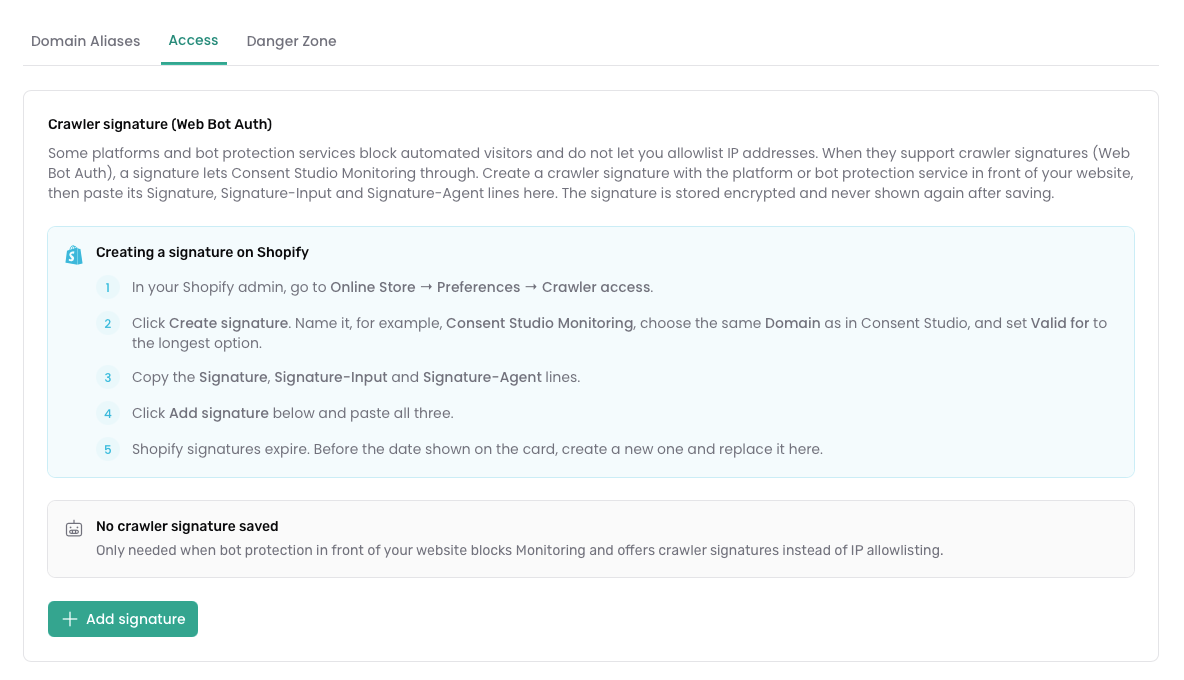
Consent Studio Monitoring now supports Web Bot Auth. Shopify and other platforms that use bot protection increasingly expect crawlers to prove who they are with Web Bot Auth (crawler signatures), instead of IP allowlists. Consent Studio Monitoring can now use those signatures.

How does it work?

In short, you can now create a crawler signature in Shopify (or your platform), add it in Consent Studio, and Monitoring authenticates the way the store expects. No IP allowlist required.

You’ll find it on the Domain Settings page, in a new tab called Access.

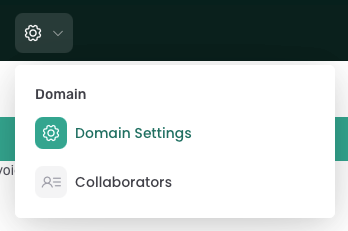
To freshen up: the Domain Settings page can be reached through the gear icon in the top bar.

Testing your signature

Use Test access to confirm Monitoring can reach your site; and check status to see whether access is working. Basic Authentication for password-protected sites is on the same tab.

Full step-by-step guide, with Shopify as an example: Web Bot Auth.

Other improvements in this batch

  • When you install Consent Studio on Shopify, the wizard now includes a clear Monitoring access step, so you set up Web Bot Auth when you need it for scans on bot-protected stores.

  • When Monitoring can’t reach a site, messages are clearer about why (including Shopify bot protection and a rejected crawler signature), with links straight to Access settings.

  • You’ll also get a reminder when a signature is due for renewal.

  • We’ve also made a few reliability and security improvements around how Monitoring authenticates to your site, and fixed email preferences for recommendation digests so they’re respected correctly.

We thank you for your feedback and your trust in The Full Consent Stack.

On behalf of the team,

Thierry Maasdam, Head of Product

New

OpenAI Pixel: Consent API + Launcher Tag

Hi everyone,

More and more advertisers are measuring results from ChatGPT Ads with the OpenAI Pixel - especially with OpenAI launching ads in Europe.

From today, Consent Studio can apply your visitors' consent decisions to it.

Integration for Web CMP

The OpenAI Pixel grants consent to itself by default, so without a consent management platform in front of it, it starts measuring before your visitor has made a choice (!).

The new OpenAI Pixel Consent API integration in Consent Studio Web CMP puts a stop to that. It withholds consent for first-time visitors, grants it as soon as marketing consent is given, and revokes it again when consent is declined or withdrawn.

You will find OpenAI Pixel Consent API under Integrations in the Web CMP dropdown. Toggle it on and click Save & Publish.

Tag template additions for Consent Studio Launcher

If you use Consent Studio Launcher, our client-side tag manager, it’s good to know that there are two new templates readily available for you:

  • The OpenAI Pixel template to install the pixel

  • The OpenAI Pixel Event template to send measurement events such as orders and leads

Both work with the integration mentioned above straight away, and the Launcher tag takes care of the consent setup for you.

Consent Studio Monitoring is ready too

Consent Studio now also recognises the pixel's tracking technologies, so they are described automatically in your consent banner and declaration.

Finally

Full setup instructions, including the one line to add if you installed the pixel manually or through Google Tag Manager can be found here.

As always, if you have any questions or run into anything unexpected, our support team is happy to help.

The Consent Studio team

New

Earlier updates